


Trading cards and other Steam-specific products form the basis of the micro-economy that exists within Steam.
Browse the collection to compare finishes, exterior conditions and the available items. Each card brings the image, item name and price together so the selection is easy to review.
Each card brings the image, item name and price together so the selection is easy to review. Open an item to see its details, compare the available variants and add the chosen version to your cart.
What Is Trade Steam URL?
A Steam Trade URL is a unique URL that others can use to view your Steam inventory and contact you for trades. Not anyone can view your inventory; you can set access to this URL.
Open an item to see its details, compare the available variants and add the chosen version to your cart. Search by name or narrow the catalog with the available filters, then clear the filters to explore the full selection again. An item can appear in several exterior conditions, and each available version is shown separately in the catalog.
So, alter the privacy settings on Steam to the public for that to happen. In contrast, only you can view your Steam inventory if it is private. A second option is to restrict your inventory access to your friends alone.
Search by name or narrow the catalog with the available filters, then clear the filters to explore the full selection again. An item can appear in several exterior conditions, and each available version is shown separately in the catalog.
How To Find Your Steam Trade URL?
You have to take only a few straightforward measures. To initiate Steam trade offers, you must make sure that your Steam Guard is enabled 15 days in advance.
You won’t be able to accept any trade offers that come your way or gain access to the community market if you don’t do this. You may obtain your Steam trade URL by following these instructions if everything is set up.
Step 1: First, go to the Steam Inventory panel.
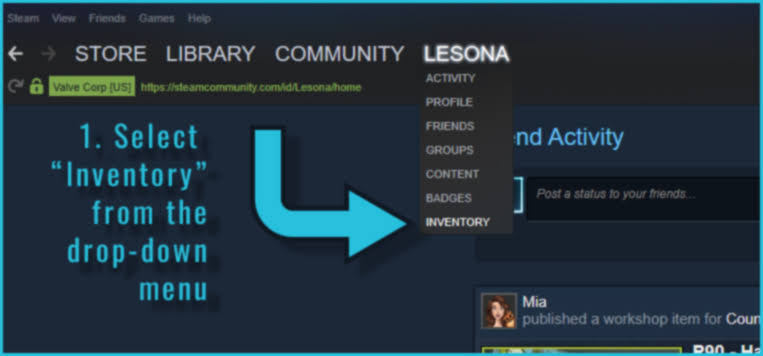
Click your username after logging in to the Steam client, and then choose the “Inventory” option from the dropdown menu of your Steam account.
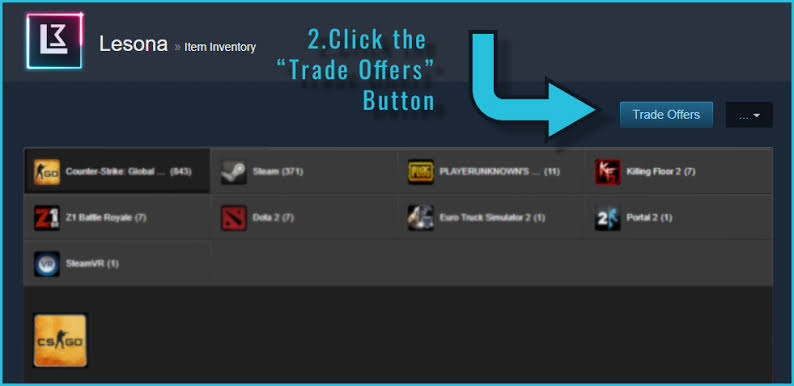
Step 2: The second step is to choose “Trade Offers” from the Steam Inventory menu.
An item can appear in several exterior conditions, and each available version is shown separately in the catalog. The cart keeps the selected items together and updates the total whenever a quantity changes or an item is removed. The current pages are a visual preview using demonstration inventory; the store will receive its own product information before launch.
Step 3: Click “Who can send me trade offers?”
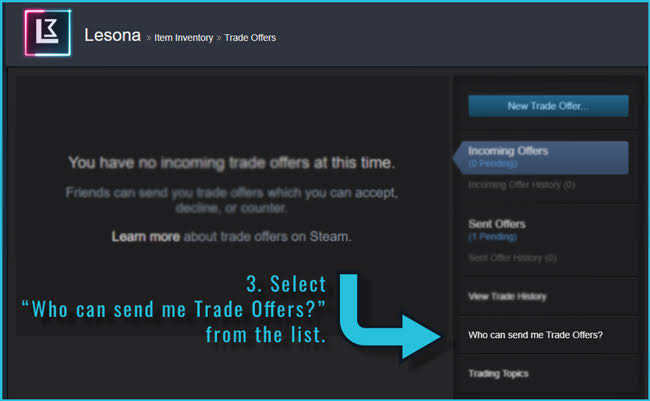
Choose the option “Who can send me trade offers?” from the navigation bar on the right side of the screen.
Step 4: Copy the Steam Trade URL.
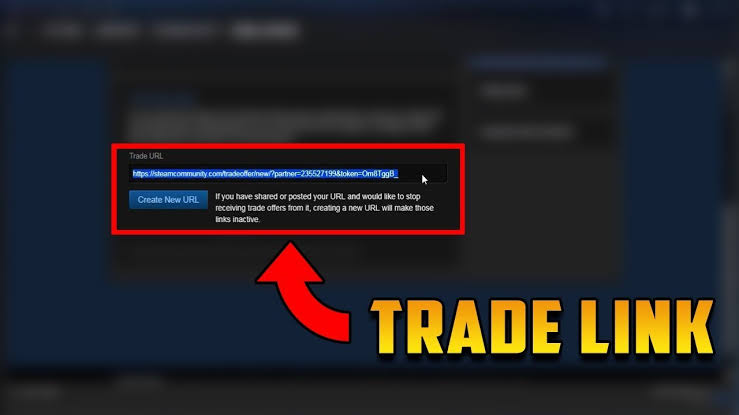
In the last, scroll down 🔽 to the bottom of the screen; here, you will see your Steam trade URL. Copy this URL. It is also possible to create a new URL.
The cart keeps the selected items together and updates the total whenever a quantity changes or an item is removed. The current pages are a visual preview using demonstration inventory; the store will receive its own product information before launch. Images, condition labels and item details provide a consistent way to explore a skin across the catalog and its detail page.
How To Enable Steam Trade Requests?
Changing your Steam privacy settings to make it possible for anyone to see your Steam inventory is a quick and easy procedure.
1: Launch Steam or go to steamcommunity.com to access it.
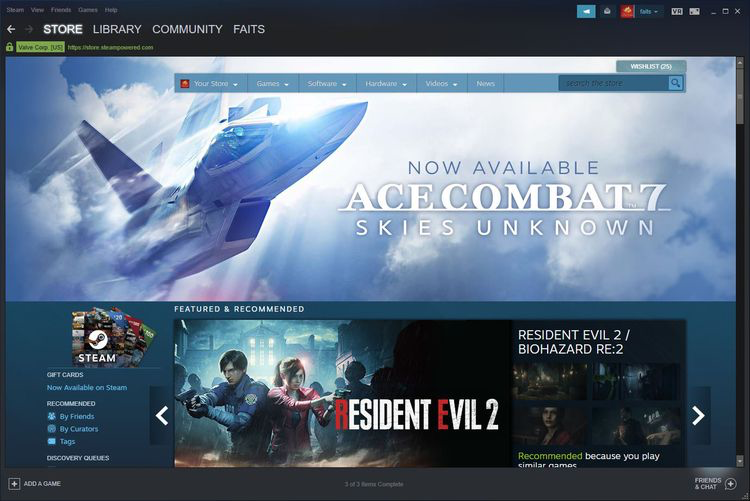
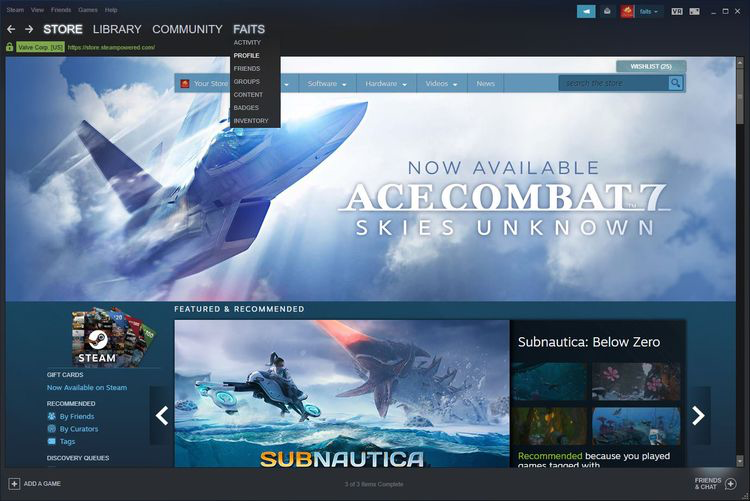
2: Click “Username” and choose “Profile” from the dropdown menu.
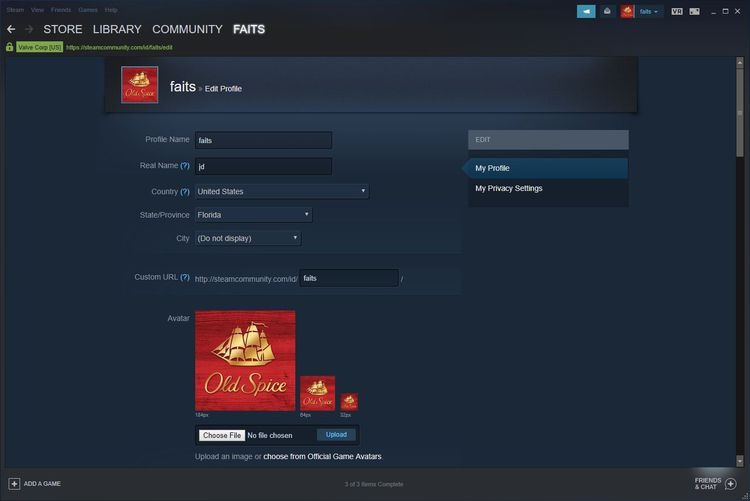
3: Now, select the option “Edit Profile” and then tap “My Privacy Settings”.
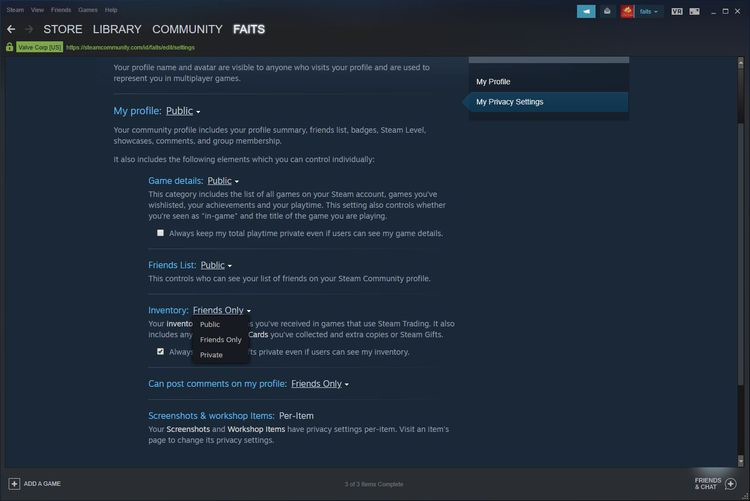
4: Click or press “Public” where it displays Inventory: Private or Inventory:
Friends Only and change it to Inventory; this setting will alter the privacy settings for your inventory to Public.
Why Do Players Need Steam Trade URLs?
To achieve a prize they have won, players might choose to tweet the link or forward it to a friend. To trade their stuff outside Steam, gamers may also want to copy their trade URL.
The current pages are a visual preview using demonstration inventory; the store will receive its own product information before launch. Images, condition labels and item details provide a consistent way to explore a skin across the catalog and its detail page.
Is Publishing a Trade Steam URL Safe?
Generally speaking, it is totally safe to share your Steam trade URL. You can decline or ignore any trade requests that are unfair or offensive, even if others can view your inventory through your trade URL on Steam.
Moreover, you can use Steam Guard to secure your account. With it, no one can access your account just by spamming or guessing your password.
Final Words:
A crucial component of Steam that enables gamers to send and accept trade offers is your Steam Trade URL. Everyone with a Public Steam inventory can send and receive a range of items and skins.
Images, condition labels and item details provide a consistent way to explore a skin across the catalog and its detail page. Browse the collection to compare finishes, exterior conditions and the available items.


